Type ä, ö, ü and ß on a US keyboard: US-International (" then a gives ä), Alt codes (ß is Alt+0223), Option on a Mac, or simply ae, oe, ue, ss.
German adds only four characters to the English alphabet: the umlauts ä, ö and ü, and the sharp s, ß. On a German keyboard each one has its own key; on a US keyboard there are several ways to type them, and a fallback that always works.
The German characters at a glance
| Character | Name | Examples |
|---|---|---|
| ä Ä | A umlaut | Mädchen, Äpfel |
| ö Ö | O umlaut | schön, Österreich |
| ü Ü | U umlaut | für, Übung |
| ß | Sharp s (Eszett) | Straße, groß |
Umlauts change words: "schon" means "already" and "schön" means "beautiful"; "zahlen" is "to pay" and "zählen" is "to count".
On a US keyboard with Windows
The US-International layout
The most comfortable option if you write German regularly. Add it once in Windows Settings (Time & language, then Language & region: add the "United States-International" keyboard to English), then switch with Windows + Space. The quotation mark becomes a dead key:
| Type | Then | You get |
|---|---|---|
| " (Shift + ') | a, o or u | ä, ö, ü |
| " (Shift + ') | Shift + A, O or U | Ä, Ö, Ü |
Right Alt also gives them directly: Right Alt + Q gives ä, Right Alt + P gives ö, Right Alt + Y gives ü, and Right Alt + S gives ß. The catch: a quotation mark before a vowel now turns into an umlaut. To type a plain quotation mark, press the key, then Space.
Alt codes
They work without changing anything, on any Windows PC with a numeric keypad (Num Lock on): hold Alt, type the four digits on the keypad, release Alt.
| Character | Code | Character | Code |
|---|---|---|---|
| ä | 0228 | Ä | 0196 |
| ö | 0246 | Ö | 0214 |
| ü | 0252 | Ü | 0220 |
| ß | 0223 |
On a laptop without a numeric keypad, use US-International or the symbols panel instead: Windows + period opens it, and its Ω tab lists accented letters.
On a Mac with a US keyboard
- Press and hold a, o, u or s: a small menu shows its other versions, each with a number. Press the number, or click.
- Option shortcuts are faster once learned:
| Press | Then | You get |
|---|---|---|
| Option + U | a, o or u | ä, ö, ü |
| Option + S | — | ß |
For a capital, add Shift to the second key: Option + U, then Shift + A gives Ä.
On a phone or tablet
Press and hold a letter on the on-screen keyboard, then slide to the accented version: hold a, o or u for ä, ö or ü, and hold s for ß. If you write German often, add a German keyboard in your phone's settings.
When nothing else works: ae, oe, ue, ss
If you can't type an umlaut at all, German has a standard fallback: write ae for ä, oe for ö, ue for ü and ss for ß, as in "Muenchen" for München or "Strasse" for Straße. Germans read it without trouble, and Switzerland does not use ß at all: Swiss Standard German writes ss in every word.
On a German keyboard
The German QWERTZ keyboard was made for these letters: ö and ä sit to the right of L, ü to the right of P, and ß to the right of 0. Z and Y also swap places. If you write German every day, switching your computer to the German layout is the most comfortable long-term choice.
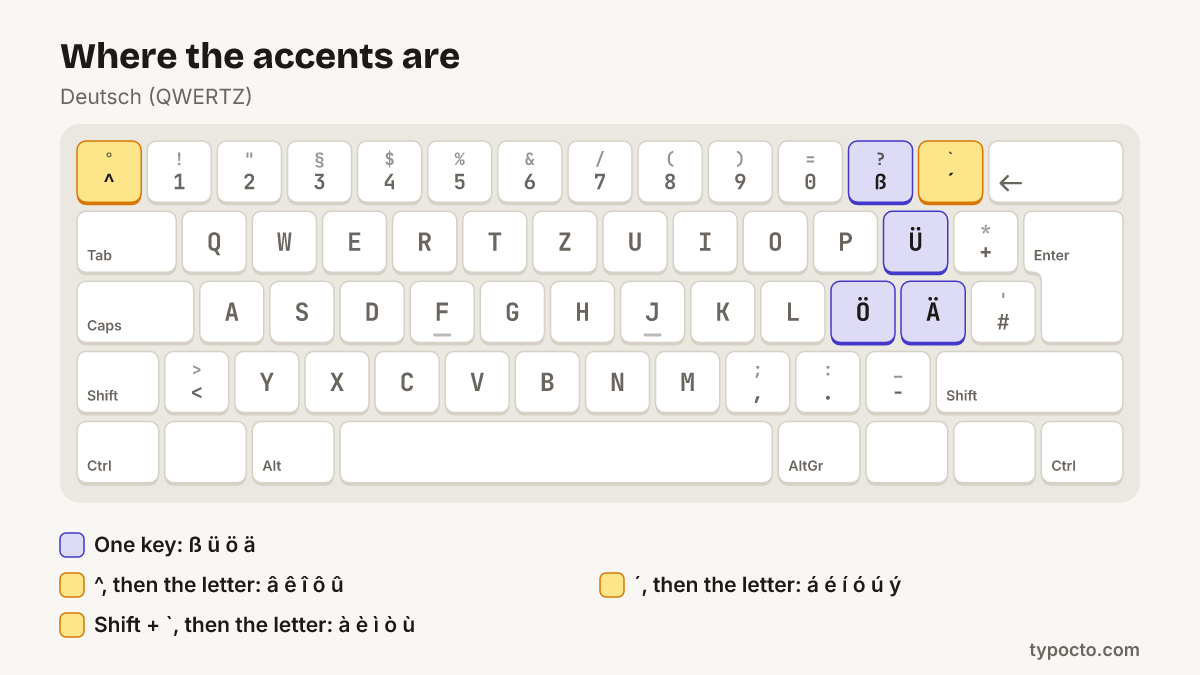
Which method should you choose?
- You write German every day: the German keyboard layout.
- You write German now and then: US-International on Windows, the Option shortcuts on a Mac.
- You need one umlaut a week: Alt codes, press-and-hold, or ae, oe, ue and ss.
Practise typing in German
Typocto has a full touch-typing course and a German speed test for German and Swiss keyboards, in German. The page Umlaute auf der Tastatur shows where each character is on your keyboard and lets you practise them. The German typing test uses real German words, umlauts included.
For other languages, see the guides for French accents and Spanish accents, or How to type accents on any keyboard.
Questions
How do I type ß on a US keyboard?
On Windows, Alt+0223 on the numeric keypad, or Right Alt + S with the US-International layout. On a Mac, Option + S. Or simply write ss.
How do I type ü on a US keyboard?
On Windows, Alt+0252, or " then u with US-International. On a Mac, Option + U, then u, or hold the u key.
Why does my quotation mark turn into an umlaut?
Your keyboard is set to US-International, where the quotation mark is a dead key. Press it and then Space to get a plain quotation mark, or switch back to the US layout with Windows + Space.
Sources
Microsoft lists the Alt codes in Insert ASCII or Unicode Latin-based symbols and characters, and Apple explains the Mac methods in Enter characters with accent marks on Mac. Key combinations follow Microsoft's and Apple's documentation (November 2026).